Items (Equipment, Parts and Supplies price list)
Company Setup - Items (Equipment, Parts and Supplies price list)
Please note that “Settings” menu is Not Available On Mobile app and must be performed from the browser

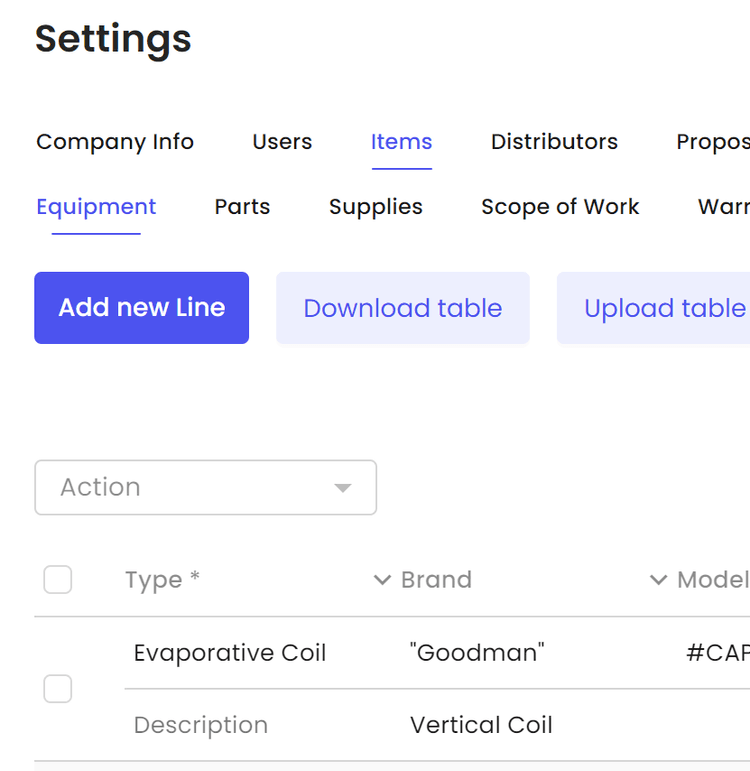
Select Items

Select from one of seven categories to add items and pricing

Equipment, Parts and Supplies have similar structure and the “Proposal Line View” format applies to these three categories.

On the proposal you will see “Type”space”Brand”space”Model””Size””Cat1””Cat2”space”Description”.
Please note that you are able to input spaces in the beginning and the end of each line to achieve the desired look. If you want to add space between “Model” and “Size”, you can add space at the end of the “Modelspace” or beginning of the “spaceSize”.
Here is No added spaces example:


Here is an example of added space after “Model”


Click “Add new Line” to add new equipment

Input the desired fields.
After inputting at least the Type and Price, save the item.
Please note that each item has to be unique.

You will receive save confirmation

Add up to Three attachments, pictures, brochures, links etc. to each item

Attach files or Urls

You can Duplicate items to make small changes within models

You can edit any field by clicking on it

Another method to input Items would be through a spreadsheet

We recommend to “Download table” then begin adding equipment. As an example we are using “Google Sheets”
Please do not modify the 1st row of the table.

Once additional equipment is added we can “Upload table”

Items will have drop down selections for Type, Model, size

Select Type, Model, size

Items will be displayed as shown with attachments

Other Articles
Contacts in Orcatec: A Complete Beginner's Guide
The Contacts tab is Orcatec's address book for every person and company your team talks to — homeowners, property managers, tenants, and the organizations behind them. This guide walks a brand-new user through the contact list, adding a new contact, and every tab inside the Edit Client window: Personal Info, Properties, Appointments, Projects, Organizations, Associations, Messaging, and Calls.
8 min read Sep 15, 2026
The Dispatch Tab in Orcatec: A Complete Beginner's Guide
The Dispatch tab is where you turn a list of jobs into an actual day for your team: assign visits to technicians, see who's free, and keep the whole week in view. This guide walks a brand-new dispatcher through the Day and Week boards, creating appointments the quick way and the full way, the Appt Queue, and customizing your board.
8 min read Sep 09, 2026
Formatting Text in Notes: A Complete Beginner's Guide (Mobile App)
A handful of simple typing conventions turn a plain note into something an installer can act on: phone numbers and emails become tap-to-copy, lines starting with a dash become lists, double asterisks make text bold, and words like "Warning" trigger a yellow alert box.
10 min read Sep 09, 2026

All-In-One Home Services Management Software


4.95 from 5 based on 17 reviews
Get our latest news