Create new office appointment
To create new appointment at the office location, click appointments to view schedule in the side menu

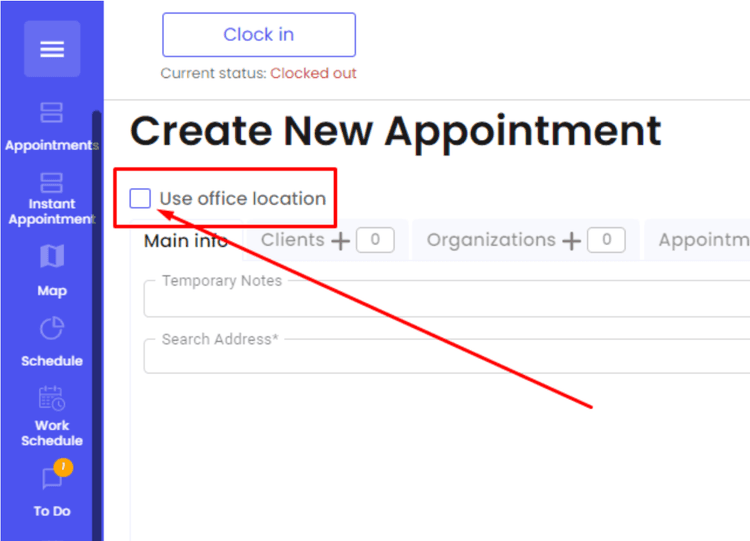
Click Create appointment

Select "Use office location"

Start typing customers information, select from matching existing clients list or continue typing to create new client

If creating new client, fill out required information

Click "Create client"

Input all applicable information in fields including promised arrival time and date

Click "Create Appointment"

Now you are able to drag and drop new appointment from the queue to desired day, time, tech.

Select appointment, drag and drop to preferred tech.

Appointment was created successfully and can be resized to block time as needed

Keep in mind that promised arrival time is not going to change by resizing appointments,whether moving to a different tech or by moving to a different slot. To change promised arrival time click on the appointment to see "Update appointment" window

Other Articles
The Dispatch Tab in Orcatec: A Complete Beginner's Guide
The Dispatch tab is where you turn a list of jobs into an actual day for your team: assign visits to technicians, see who's free, and keep the whole week in view. This guide walks a brand-new dispatcher through the Day and Week boards, creating appointments the quick way and the full way, the Appt Queue, and customizing your board.
5 min read Sep 09, 2026
The Projects Tab in Orcatec: A Complete Beginner's Guide
The Projects tab is the central workspace of your Orcatec account — where an estimate becomes a signed contract, gets worked on, and finally gets invoiced. This guide walks a brand-new user through statuses, Good/Better/Best pricing options, line items, discounts and taxes, and the client-facing Preview.
8 min read Sep 09, 2026
Getting Started with Orcatec: Complete Onboarding Guide for Contractors and Subcontractors
A step-by-step onboarding guide to help you set up your Orcatec account, create projects, link contacts and properties, manage payment schedules, and generate invoices — everything you need to get started smoothly.
5 min read Nov 13, 2025

All-In-One Home Services Management Software


4.95 from 5 based on 17 reviews
Get our latest news