• Home

  • Get Paid & Expenses

    Commissions Management

    QuickBooks Integration

    Consumer Financing

    Expenses Tracking

    Contractor Payroll

    Card Reader

    Payment

    Job Management

    Work Order Management

    Field Service CRM

    Job Management

    Employee Time Tracking

    Job Costing

    Recurring Jobs

    Supplies order

    Job Tracking

    Equipment tracking

    Complete Job & Invoice

    Sales Proposal Tool

    Invoicing

    Estimates

    Quoting

    Mobile App

    Review Management

    Price pages

    Accounting

    Scheduling & Dispatching

    Employee GPS Tracking

    Scheduling Software

    Route Optimization

    Field Service App

    Call Recording

    Dispatching

    Business Solutions

    Automated Direct Mail

    Advanced Reporting

    Home Services Marketing

    Text Messaging

    Voice Solutions

    See all Features
  • Industries

    HVAC

    Plumbing

    Construction

    Appliance Repair

    Electrician

    Garage Door

    Handyman

    Home Cleaning

    Carpet Cleaning

    Painting

    Window Cleaning

    Locksmith

    Property Maintenance

    Junk Removal

    Fire Safety

    See all Industries
  • Resources

    Blog

    Stay informed and inspired with our engaging blog, featuring industry insights and expert tips

    Tutorial

    Step-by-step tutorials: Creating, editing, and scheduling on the site. Our tutorials will help you understand how to create projects, grasp the meanings of various statuses, and efficiently schedule meetings

    image
  • Company

    Contact Us

    Orcatec is your all-in-one home services management software designed to save you time, money, and boost productivity. It organizes all your tasks, synchronizes the work of your team, technicians, and clients.

    About Us

    Get in touch with our team anytime! We are here to answer any question may you have.

    image
  • Features

    • Scheduling Software
    • Estimates
    • Dispatching
    • Invoicing
    • Sales Proposal Tool
    • Field Service Management
    • Employee GPS Tracking
  • Industries

    • HVAC
    • Plumbing
    • Construction
    • Appliance Repair
    • Electrician
    • View All
  • Resources

    • Blog
    • Tutorial
  • Company

    • Contact us
    • About us
    • Privacy Policy
16950 Via de Santa Fe Suite 5060-136
Rancho Santa Fe, CA 92091
Copyright © 2026
Terms of usePrivacy Policy
  • Home
  • Features

      Get Paid & Expenses

      • Commissions Management
      • QuickBooks Integration
      • Consumer Financing
      • Expenses Tracking
      • Contractor Payroll
      • Card Reader
      • Payment

      Job Management

      • Work Order Management
      • Field Service CRM
      • Job Management
      • Employee Time Tracking
      • Job Costing
      • Recurring Jobs
      • Supplies order
      • Job Tracking
      • Equipment tracking

      Complete Job & Invoice

      • Sales Proposal Tool
      • Invoicing
      • Estimates
      • Quoting
      • Mobile App
      • Review Management
      • Price pages
      • Accounting

      Scheduling & Dispatching

      • Employee GPS Tracking
      • Scheduling Software
      • Route Optimization
      • Field Service App
      • Call Recording
      • Dispatching

      Business Solutions

      • Automated Direct Mail
      • Advanced Reporting
      • Home Services Marketing
      • Text Messaging
      • Voice Solutions
  • Industries

    • HVAC
    • Plumbing
    • Construction
    • Appliance Repair
    • Electrician
    • Garage Door
    • Handyman
    • Home Cleaning
    • Carpet Cleaning
    • Painting
    • Window Cleaning
    • Locksmith
    • Property Maintenance
    • Junk Removal
    • Fire Safety
  • Resources

    • Blog
    • Tutorial
  • Company

    • Contact Us
    • About Us
  • Tutorial
  • Clock-in-and-out
Time Cards with Orcatec

How To Use Time Cards

May 25, 2022

Once you input your credentials to Log in, you are on the Appointments page. You may clock in right on this page just by pressing the Clock In button in the top right corner of the page as shown on the example below:

Or you may also find it easier to go straight to your day Schedule and Clock in from there. You just need to press on the button in the top left corner of the page:

You will see the options in the example below, so you need to choose Schedule:


Once there, you will see the Schedule for today. Make sure to clock in at the top right corner of the screen:


Once you click Clock in, your status would be changed immediately:

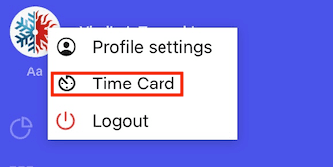
We recommend Clocking out during your lunch break, then clocking back in and clocking out at the end of your working day. This simple feature would allow the Admin to keep track of the working hours of each employee, and you can always double check the time you worked. To do so, simply go to the Time Card menu by pressing on the Menu button in the left top corner, and then on your profile picture, you will see a small pop-up where you need to choose Time Card:

After you’ve done so, you need to choose the date range, and you will be able to review your working hours accordingly:

We are sure that those steps would be useful and easy to follow! 


Other Articles

Customer Texts and Automatic Reminders in Orcatec: A Complete Beginner's Guide

A click-by-click guide to texting customers from Orcatec and setting up automatic notifications: appointment reminders, En Route texts, cancellations and more, with real message examples and holiday-week tips.

7 min read Sep 28, 2026

Time Cards in Orcatec: A Complete Beginner's Guide

A step-by-step guide to Time Cards in Orcatec. Learn how your team clocks in and out on web and mobile, how the office reviews and exports hours, and a simple weekly routine that makes payroll faster.

7 min read Sep 28, 2026

The Map in Orcatec: A Complete Beginner's Guide

The Map shows your team's day by location, so you can see who is closest to a new call. This guide covers the toolbar, employee filter, schedule panel, creating appointments from the Map and what needs the GPS Tracking add-on.

3 min read Sep 28, 2026
article-data

All-In-One Home Services Management Software

instagramfacebook

4.95 from 5 based on 17 reviews

Get our latest news
image